Wednesday, January 25, 2012

Social media buttons


//linked in like button
http://developer.linkedin.com/plugins/share-button

//twitter tweet button
https://twitter.com/about/resources/buttons#tweet
https://dev.twitter.com/docs/tweet-button

//facebook like button
http://developers.facebook.com/docs/reference/plugins/like/

//google +1 button
http://www.google.com/intl/en/webmasters/+1/button/index.html

Get Current CMS Page : Magento(CMS Pages Data)

// get current cms page from Mage:getSingleton
$cms_id = Mage::getSingleton('cms/page')->getIdentifier();
$cms_title = Mage::getSingleton('cms/page')->getTitle();
$cms_content = Mage::getSingleton('cms/page')->getContent();

Get Current Category : Magento(Category Data)

// get current category from Mage:registry
$currentcategory = Mage::registry('current_category');

// general category data
echo $currentcategory->getName();
echo $currentcategory->getId();
echo $currentcategory->getImageUrl();
echo $currentcategory->getUrl();

Get Current Product : Magento (Product Data)

// get current product from Mage:registry
$currentproduct = Mage::registry('current_product');

// general product data
echo $currentproduct->getName();
echo $currentproduct->getId();
echo $currentproduct->getProductUrl();
echo $currentproduct->getSku();

// get attributes
echo $currentproduct->getAttributeText('attribute_name');

// get image src
echo $this->helper('catalog/image')->init($currentproduct, 'small_image')->resize(100);

Thursday, January 19, 2012

Javascript validate text box to enter only number

Javascript  validate text box to enter only number

<script type="text/javascript">
function validate(evt) {
  var theEvent = evt || window.event;
  var key = theEvent.keyCode || theEvent.which;
  key = String.fromCharCode( key );
  var regex = /[0-9]|\x08/;
  if( !regex.test(key) ) {
    theEvent.returnValue = false;
    if(theEvent.preventDefault) theEvent.preventDefault();
  }
}
</script>


<input type="text" name="afroz" value=""  onkeypress='validate(event)' >


//When you enter any text , decimal or special character in the text box it will not be entered. Only numbers
and backspace are allowed. Even decimal is restricted tto enter.

Tuesday, January 17, 2012

Google chart tutorial

http://code.google.com/apis/chart/image/docs/gallery/pie_charts.html#pie_chart_label

Tuesday, January 10, 2012

Reset Mysql Server password

Forgot Password?Come HERE

First of All Stop MySQL Server as Follows

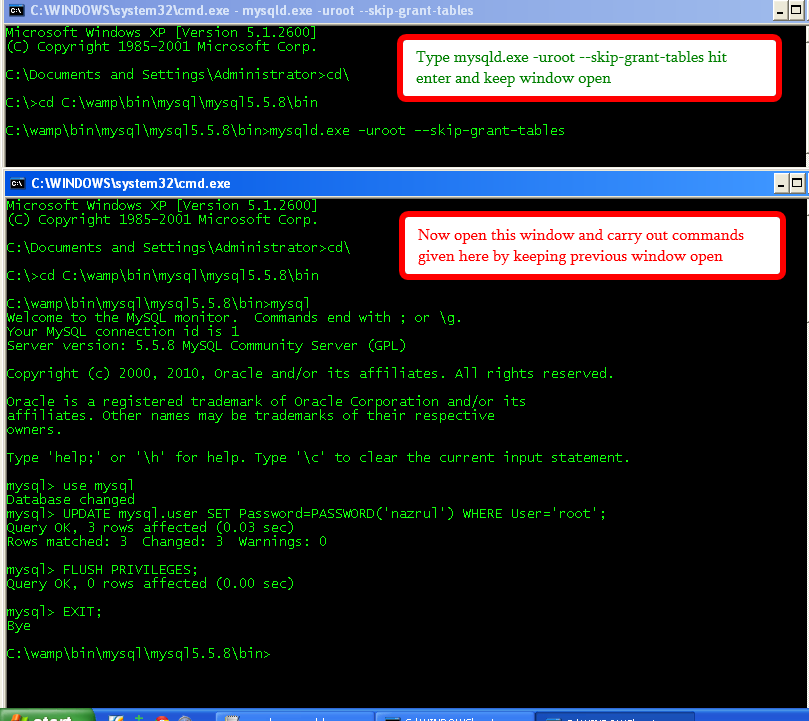
Now Start a  command prompt by pressing Windows+R Key
Now type  cmd  and hit Enter and carry out  following steps
Now open another command prompt by pressing Windows+R Key  and type cmd keeping the above prompt open and Change passwords and flush privileges as shown below

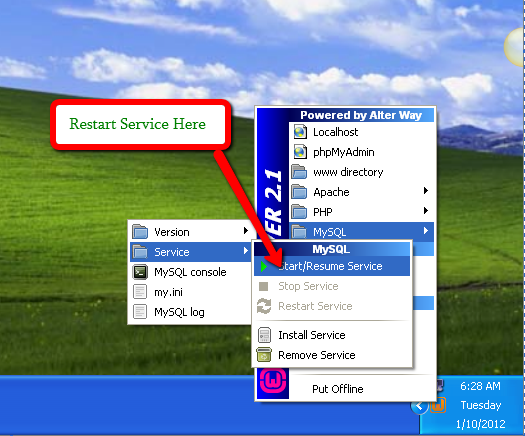
Now Close Both command prompt and Restart MySQL Server as Follows


Now open command prompt by pressing Windows+R Key and carry out following process now MySQL connects with new passwords

Now you can also set password to null as shown below